05 MAY 2026
Important update: some emails from us will be encrypted
To help keep your personal and financial information safe, we’re improving the way we send certain emails. From Wednesday 6 May, if an email includes sensitive information, we may send it as an encrypted message.
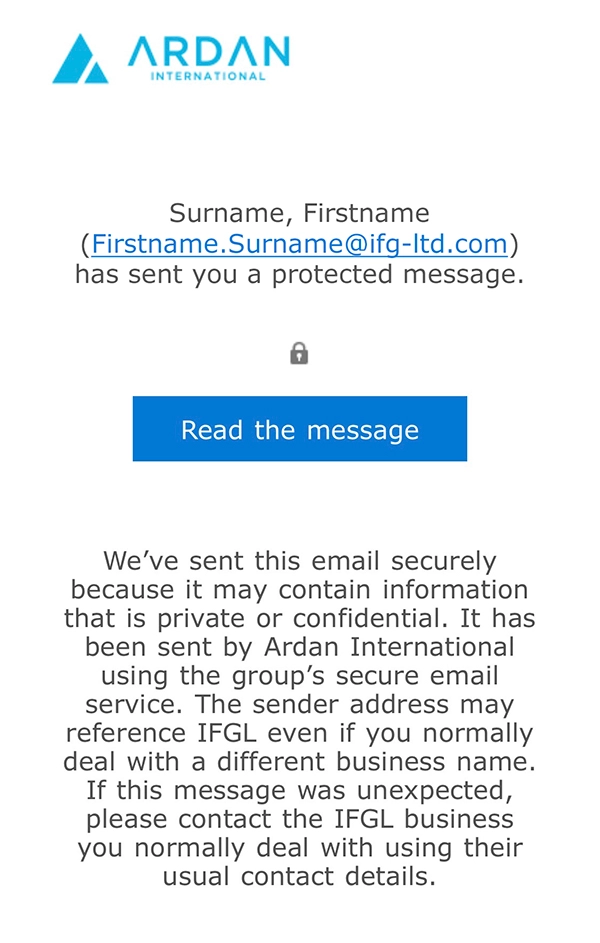
- What an encrypted email looks like
Encrypted emails can look a little different from normal emails. You might see a “Read the message” button or link. When you click it, the email opens securely. You may see a “Read the message” link/button to open the email securely (depending on your email setup, it may also open directly in your inbox or you may be presented with the option to receive a one-time code).
How to check the email is genuine
- Check the sender’s email address - it must come from one of our domains (see list below).
- Hover over the “Read the message” link/button before clicking – the web address should start with https://outlook.office365.com/encryption.
- Look for our branding when the secure message opens.
Our email domains: @ardan-international.com
Important safety reminders
We will never ask you for your password by email, and we will never ask you to download unexpected attachments.
If anything doesn’t look right, please don’t click any links. Just contact us using our usual phone number or contact details and we’ll be happy to check it with you.